Building a Secure Authentication System from Scratch
Introduction
Authentication is the front door to your application. Get it wrong, and every other layer of security you’ve built collapses. Yet despite its critical importance, authentication remains one of the most commonly misimplemented components in modern software.
The consequences of poor authentication are not theoretical. In 2012, LinkedIn suffered a breach that exposed 117 million password hashes — stored with MD5, without salt. In 2019, Facebook stored hundreds of millions of user passwords in plain text, accessible to internal employees. In 2021, RockYou2021 — the largest password compilation ever assembled — released 8.4 billion plaintext credentials, fueling a wave of credential stuffing attacks across the internet.
These aren’t failures of exotic zero-day exploits. They’re failures of basic authentication hygiene.
Before going further, it’s important to distinguish two concepts that developers often conflate:
- Authentication — Who are you? Verifying that a user is who they claim to be (credentials, tokens, biometrics).
- Authorization — What are you allowed to do? Determining what resources or actions an authenticated user can access.
Authentication comes first. Authorization depends on it. This article focuses entirely on authentication — doing it right, from scratch.
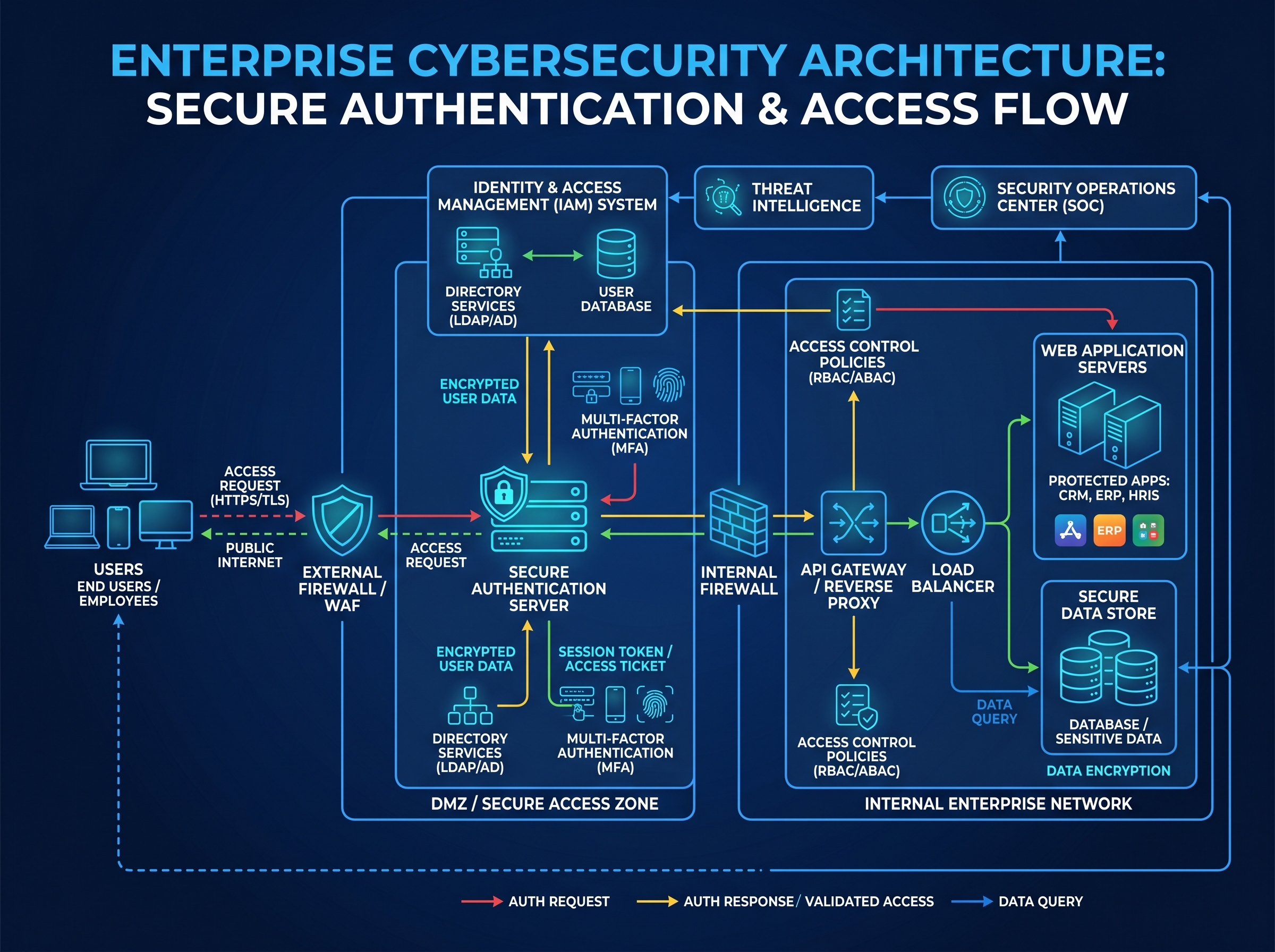
High-Level Architecture
User → Authentication Server → Database → Protected Resources
         ↑                        ↓
    Token/Session          Password Hash
     Validation            & User Record
Section 1: Understanding Authentication Fundamentals
User Identity Verification
Identity verification is the act of confirming that the entity requesting access (a human, a service, a device) is genuinely who they claim to be. In web applications, this most commonly takes the form of checking a submitted credential against a stored record.
Types of Credentials
Credentials fall into three broad categories:
- Something you know — passwords, PINs, security questions
- Something you have — hardware tokens, authenticator apps, SMS codes
- Something you are — fingerprints, face recognition, behavioral biometrics
Most systems rely on the first category alone, which is why the other two exist to compensate for its weaknesses.
Password-Based Authentication
The most widespread authentication mechanism. A user creates a password during registration; on subsequent logins, the submitted password is verified against the stored record. The implementation details — how the password is stored, transmitted, and validated — determine whether this mechanism is secure or catastrophic.
Token-Based Authentication
Rather than maintaining a server-side record of who is logged in, the server issues a cryptographically signed token after successful authentication. The client stores this token and includes it in subsequent requests. The server validates the token’s signature rather than querying a session store. JWT (JSON Web Token) is the dominant format.
Session-Based Authentication
After login, the server generates a session ID, stores session data server-side (in memory, Redis, a database), and sends the session ID to the client via a cookie. Each request carries the session ID; the server looks it up to verify the user’s identity. This approach is stateful — the server must maintain session records.
Multi-Factor Authentication (MFA)
MFA requires users to provide two or more verification factors. Even if a password is stolen, an attacker still cannot authenticate without the second factor. MFA dramatically reduces account compromise risk and is covered in depth in Section 10.
Section 2: Secure Password Storage
Why Plain Text Is Catastrophic
Storing passwords in plain text means that any database breach immediately exposes every user’s password. The consequences compound because of password reuse — studies consistently show that over 50% of users reuse passwords across multiple sites. A breach of your database becomes a breach of your users’ email, banking, and social media accounts.
Credential stuffing — automated attacks that test leaked username/password pairs against other services — is now one of the most common attack vectors precisely because so many services store or transmit passwords insecurely.
Hashing vs Encryption
- Encryption is reversible. Given the key, you can recover the original value. This means if an attacker gets both your database and your encryption key, they have all plaintext passwords. Encrypting passwords for storage is wrong.
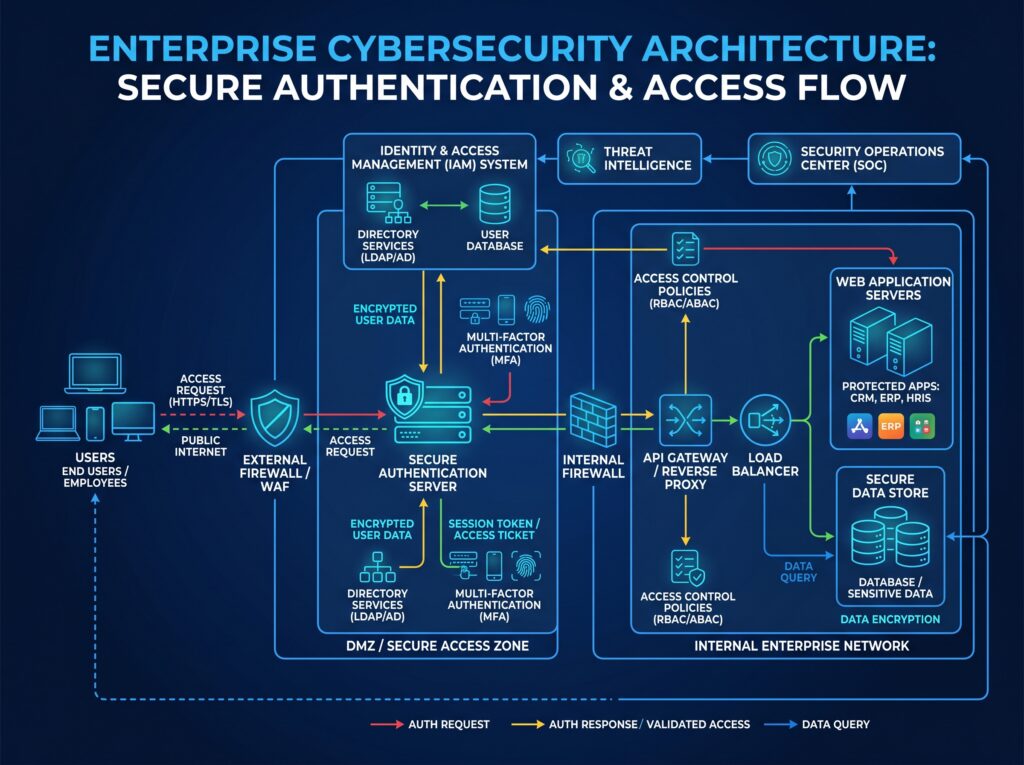
- Hashing is one-way. A hash function maps input to a fixed-size output, and it is computationally infeasible to reverse it. When a user logs in, you hash the submitted password and compare it to the stored hash. The original password never needs to be recovered.
This is the correct model: store hashes, never plaintext, never encrypted passwords.
But not all hash functions are created equal.
bcrypt
bcrypt was designed in 1999 specifically for password hashing. It has two critical properties that generic cryptographic hash functions (MD5, SHA-1, SHA-256) lack:
- Salt generation — bcrypt automatically generates and stores a random salt for each password, ensuring that two users with the same password have different hashes, and that precomputed rainbow table attacks are useless.
- Cost factor (work factor) — bcrypt accepts a cost parameter that controls how computationally expensive hashing is. As hardware improves, you increase the cost factor. A cost of 12 is commonly recommended today.
Node.js:
const bcrypt = require('bcrypt');

const COST_FACTOR = 12;

// Registration — hash the password
async function hashPassword(plaintext) {
  const hash = await bcrypt.hash(plaintext, COST_FACTOR);
  return hash; // Store this in your database
}

// Login — verify submitted password
async function verifyPassword(plaintext, storedHash) {
  const match = await bcrypt.compare(plaintext, storedHash);
  return match; // true if password is correct
}
Python:
import bcrypt

# Registration
password = b"user_password"
salt = bcrypt.gensalt(rounds=12)
hashed = bcrypt.hashpw(password, salt)

# Login
is_valid = bcrypt.checkpw(password, hashed)
Limitations of bcrypt: bcrypt has a 72-byte input limit (passwords longer than 72 characters are truncated). It also does not resist GPU-based attacks as effectively as modern alternatives.
Argon2
Argon2 won the Password Hashing Competition in 2015 and is the current state-of-the-art recommendation from security researchers. It was designed with three properties in mind:
- Memory hardness — Argon2 requires large amounts of RAM to compute. GPUs have many cores but limited per-core memory, making parallel GPU attacks far less effective.
- Configurable parameters — time cost (iterations), memory cost (kilobytes), and parallelism can all be tuned independently.
- No input length limit — unlike bcrypt’s 72-byte ceiling.
There are three variants: Argon2d (GPU resistance), Argon2i (side-channel resistance), and Argon2id (hybrid, recommended for most applications).
Node.js:
const argon2 = require('argon2');

// Registration
async function hashPassword(plaintext) {
  const hash = await argon2.hash(plaintext, {
    type: argon2.argon2id,
    memoryCost: 2 ** 16, // 64 MB
    timeCost: 3,
    parallelism: 1,
  });
  return hash;
}

// Login
async function verifyPassword(plaintext, storedHash) {
  return await argon2.verify(storedHash, plaintext);
}
Python:
from argon2 import PasswordHasher

ph = PasswordHasher(time_cost=3, memory_cost=65536, parallelism=1)

# Registration
hash = ph.hash("user_password")

# Login
try:
    ph.verify(hash, "user_password")
    is_valid = True
except:
    is_valid = False
Comparison: bcrypt vs Argon2
| Feature | bcrypt | Argon2 |
|---|---|---|
| Security | High | Very High |
| Performance | Moderate (intentionally slow) | Tunable |
| Memory Resistance | Low | High (memory-hard by design) |
| Ease of Use | Very easy, widely supported | Easy, growing support |
| Recommended Today | Yes, acceptable | Yes, preferred |
Section 3: Building Registration Securely
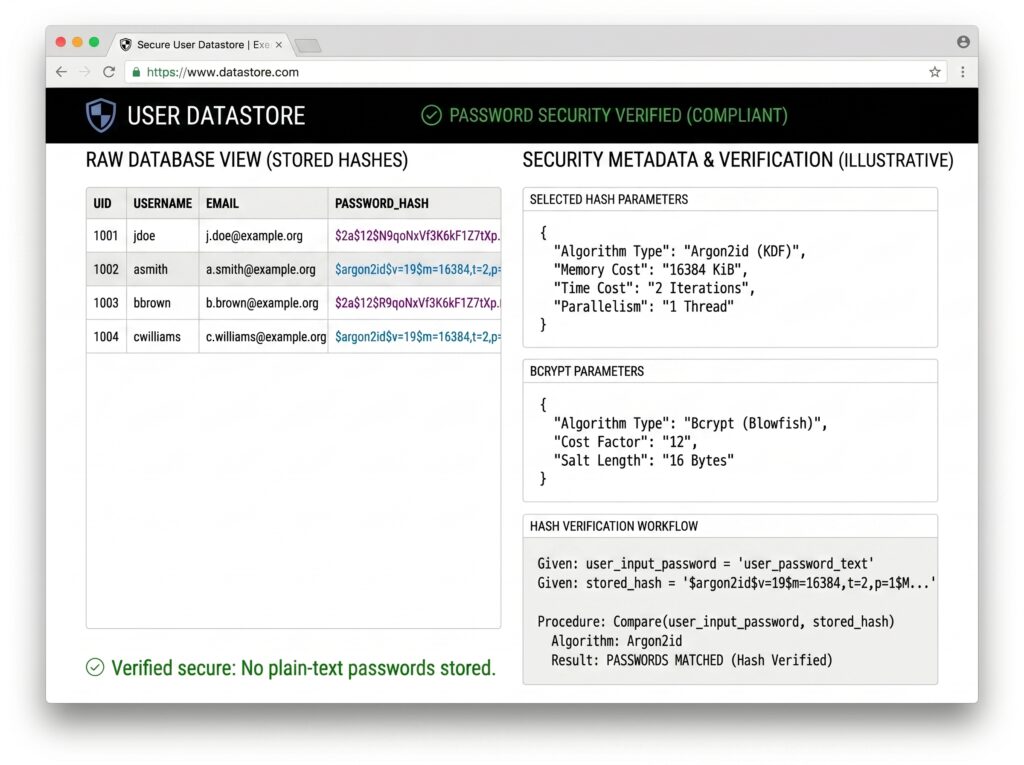
A secure registration flow does more than hash the password. It validates input, enforces policies, and verifies the user’s identity before activating the account.
Input Validation
Email validation:
- Verify format with a reliable regex or library (e.g.,
validator.jsin Node.js) - Normalize the address (lowercase, trim whitespace)
- Do not rely solely on format validation — verify via email confirmation
Password strength requirements:
- Minimum 12 characters (NIST SP 800-63B recommends at least 8, but 12+ is better practice)
- Check against a list of commonly breached passwords (e.g., HaveIBeenPwned’s Pwned Passwords API)
- Do not impose overly restrictive character requirements that push users toward weak, predictable patterns
- Allow the use of password managers (accept long passwords, allow paste)
Username validation:
- Sanitize for SQL injection and XSS
- Enforce uniqueness at the database level with a unique index
- Consider whether usernames should be public (privacy implications)
Password Policies
const commonPasswords = require('./common-passwords.json'); // loaded list

function validatePassword(password) {
  if (password.length < 12) {
    throw new Error('Password must be at least 12 characters');
  }
  if (commonPasswords.includes(password.toLowerCase())) {
    throw new Error('This password is too common. Please choose a unique password.');
  }
  return true;
}
Email Verification
Every registration flow should require email verification before activating an account. This prevents fake accounts, reduces spam, and confirms you have a valid communication channel with the user.
Implementation:
- Generate a cryptographically random token:
crypto.randomBytes(32).toString('hex') - Store the token (hashed) in your database with an expiration timestamp (24 hours is common)
- Email the user a link containing the token:
https://yourdomain.com/verify-email?token=<token> - When clicked, look up the hashed token, verify it hasn’t expired, mark the account as verified, and delete the token
Registration Workflow
User submits email + password
         ↓
    Validate input
         ↓
    Check email uniqueness
         ↓
    Hash password (Argon2/bcrypt)
         ↓
    Store user record (unverified)
         ↓
    Generate verification token
         ↓
    Send verification email
         ↓
    User clicks link → account activated
Section 4: Implementing Login Authentication
Step-by-Step Login Flow
- User submits credentials — email/username and password over HTTPS
- Server validates the request — check rate limits, lockout status, input format
- Look up the user record — fetch by email/username; do not reveal whether the account exists in error messages (use generic “Invalid credentials” responses)
- Verify the password hash — compare submitted password against stored hash using
bcrypt.compare()orargon2.verify() - Create session or token — on success, issue a session ID or JWT
- Return authentication response — set cookie or return token
async function login(email, password, req, res) {
  // Generic error prevents user enumeration
  const INVALID_MSG = 'Invalid email or password';

  const user = await db.users.findByEmail(email.toLowerCase());
  if (!user) {
    await simulateHashDelay(); // Prevent timing attacks
    return res.status(401).json({ error: INVALID_MSG });
  }

  if (user.locked_until && user.locked_until > new Date()) {
    return res.status(429).json({ error: 'Account temporarily locked. Try again later.' });
  }

  const valid = await argon2.verify(user.password_hash, password);
  if (!valid) {
    await recordFailedAttempt(user.id);
    return res.status(401).json({ error: INVALID_MSG });
  }

  await resetFailedAttempts(user.id);
  const token = generateJWT(user);
  res.json({ token });
}
Rate Limiting
Brute force attacks submit thousands of password guesses per second. Without rate limiting, an 8-character lowercase password can be cracked in seconds at scale.
Strategies:
- IP-based rate limiting — limit login attempts per IP address (e.g., 10 attempts per 15 minutes). Use Redis for distributed environments.
- Account-based rate limiting — limit attempts per username regardless of IP (catches distributed attacks from botnets)
- Progressive delays — add increasing delays after each failed attempt without locking the account
const rateLimit = require('express-rate-limit');

const loginLimiter = rateLimit({
  windowMs: 15 * 60 * 1000, // 15 minutes
  max: 10, // max 10 login attempts per window per IP
  message: 'Too many login attempts. Please try again later.',
  standardHeaders: true,
  legacyHeaders: false,
});

app.post('/auth/login', loginLimiter, login);
Account Lockout Policies
Temporary lockout — after N failed attempts (e.g., 5), lock the account for a set period (e.g., 15–30 minutes). This severely limits automated attacks without permanently denying access to legitimate users.
Security trade-off: Aggressive lockout policies enable denial-of-service attacks where an attacker deliberately locks out legitimate users. Balance lockout thresholds against your threat model. For most applications, temporary lockout (not permanent) with notifications is the right balance.
Section 5: Session-Based Authentication
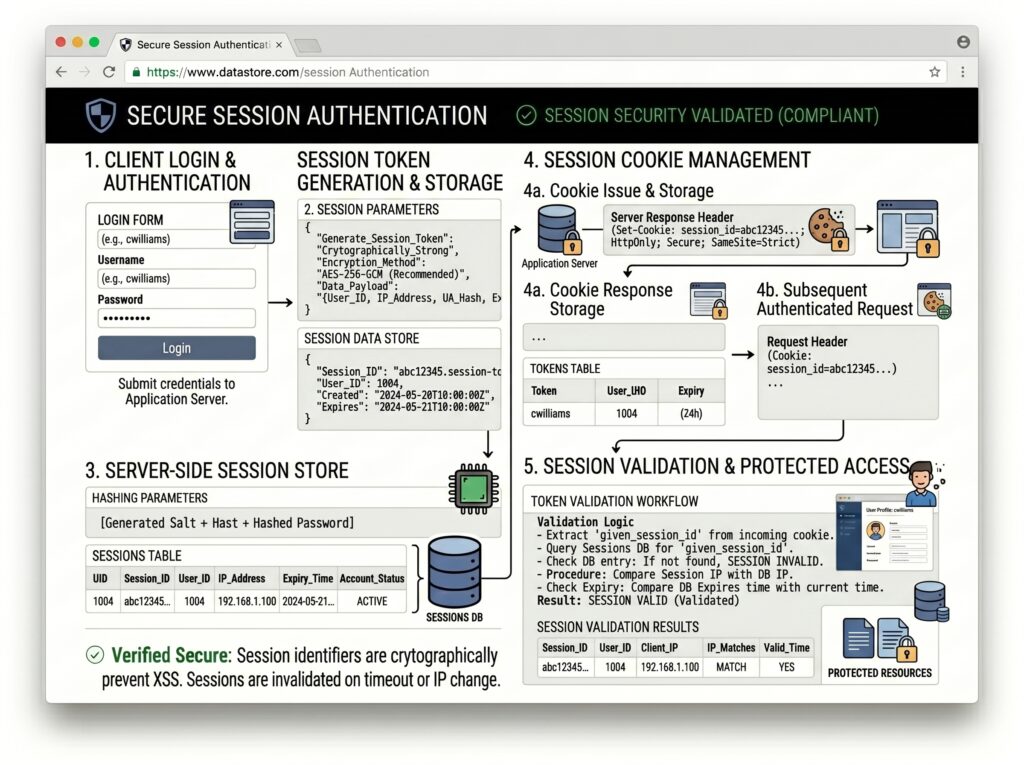
Sessions are the traditional approach to maintaining authenticated state in web applications. The server generates a unique session ID after login, stores session data on the server side, and sends the session ID to the browser as a cookie.
Session Lifecycle
Login success
    ↓
Generate cryptographically random session ID
    ↓
Store session data in session store (Redis/DB)
    ↓
Set session ID in HttpOnly cookie
    ↓
Each request: read cookie → look up session → validate
    ↓
Logout: delete session from store, clear cookie
    ↓
Expiration: sessions auto-expire based on last activity
Session Security
HttpOnly cookies prevent JavaScript from accessing the cookie. This blocks XSS attacks from stealing the session ID.
Secure cookies ensure the cookie is only transmitted over HTTPS, preventing interception on unencrypted connections.
SameSite cookies restrict when cookies are sent with cross-site requests, significantly reducing CSRF risk:
SameSite=Strict— cookie only sent for same-site requestsSameSite=Lax— cookie sent for same-site requests and top-level navigations (recommended default)SameSite=None— required for cross-site use, must be paired withSecure
Session fixation prevention: Always generate a new session ID after login. An attacker who plants a session ID before login should not be able to reuse it after the user authenticates.
Session hijacking prevention: Use short session expiration times for sensitive operations, re-authenticate before critical actions, and optionally bind sessions to the user’s IP or user agent.
app.use(session({
  secret: process.env.SESSION_SECRET,
  resave: false,
  saveUninitialized: false,
  cookie: {
    httpOnly: true,
    secure: process.env.NODE_ENV === 'production',
    sameSite: 'lax',
    maxAge: 1000 * 60 * 60 * 24 // 24 hours
  },
  store: new RedisStore({ client: redisClient }) // server-side storage
}));
Section 6: JWT Authentication
JSON Web Tokens (JWTs) are a compact, URL-safe format for representing claims between two parties. They enable stateless authentication — the server doesn’t need to store session records.
JWT Structure
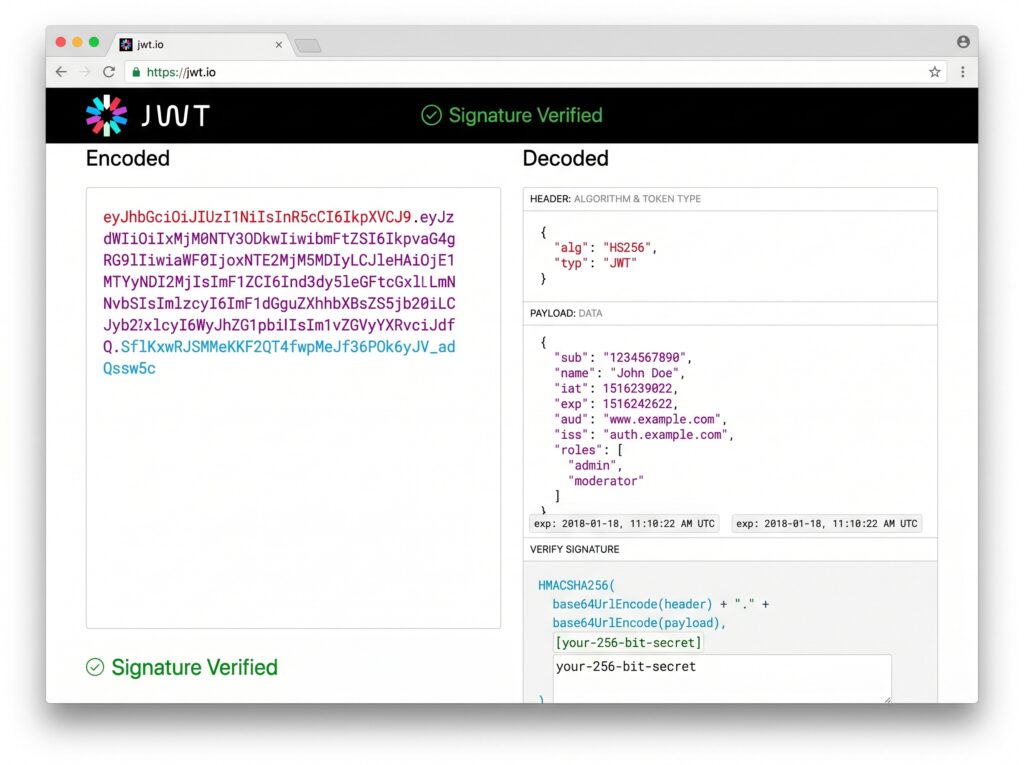
A JWT consists of three Base64URL-encoded parts separated by dots:
eyJhbGciOiJIUzI1NiIsInR5cCI6IkpXVCJ9    ← Header
.eyJ1c2VySWQiOiIxMjMiLCJlbWFpbCI6InVAZS5jb20iLCJpYXQiOjE2MjAwMDAwMDAsImV4cCI6MTYyMDAwMzYwMH0
                                           ← Payload
.SflKxwRJSMeKKF2QT4fwpMeJf36POk6yJV_adQssw5c  ← Signature
Header:
{
  "alg": "HS256",
  "typ": "JWT"
}
Payload (claims):
{
  "userId": "123",
  "email": "user@example.com",
  "iat": 1620000000,
  "exp": 1620003600
}
Signature: HMAC-SHA256 of the encoded header + payload using a secret key. This prevents tampering — any change to the header or payload invalidates the signature.
JWT Authentication Flow
1. User submits credentials
2. Server verifies credentials
3. Server generates JWT with claims + expiration
4. JWT returned to client
5. Client stores JWT (HttpOnly cookie preferred)
6. Client includes JWT in each request (Authorization: Bearer <token> or cookie)
7. Server validates signature + expiration on each request
8. Server extracts user identity from payload
const jwt = require('jsonwebtoken');

const SECRET = process.env.JWT_SECRET; // Long, random, kept secret

function generateToken(user) {
  return jwt.sign(
    { userId: user.id, email: user.email, role: user.role },
    SECRET,
    { expiresIn: '15m' } // Short-lived access tokens
  );
}

function verifyToken(token) {
  return jwt.verify(token, SECRET); // Throws if invalid or expired
}
Advantages of JWT
- Stateless — no session store required; scales horizontally without shared state
- Self-contained — the token carries all needed claims, reducing database lookups
- API-friendly — works seamlessly across domains and with mobile clients
Disadvantages of JWT
- Revocation is hard — a valid JWT cannot be invalidated before expiration without maintaining a token blocklist (which reintroduces statefulness)
- Token theft — if stolen, a JWT is valid until expiration; short expiry times are essential
- Long-lived token risk — developers often set long expiration times for convenience, dramatically increasing the attack window
Section 7: Refresh Tokens
Short-lived access tokens (15–60 minutes) reduce the damage window if a token is stolen. But they mean the user would be logged out every 15 minutes — unacceptable UX. Refresh tokens solve this.
Why Access Tokens Expire
An access token with a 15-minute expiry can only be misused for 15 minutes if stolen. A token that expires in 30 days gives an attacker a month of access. Short expiry + refresh tokens give you the security of frequent expiration without the UX cost of frequent re-authentication.
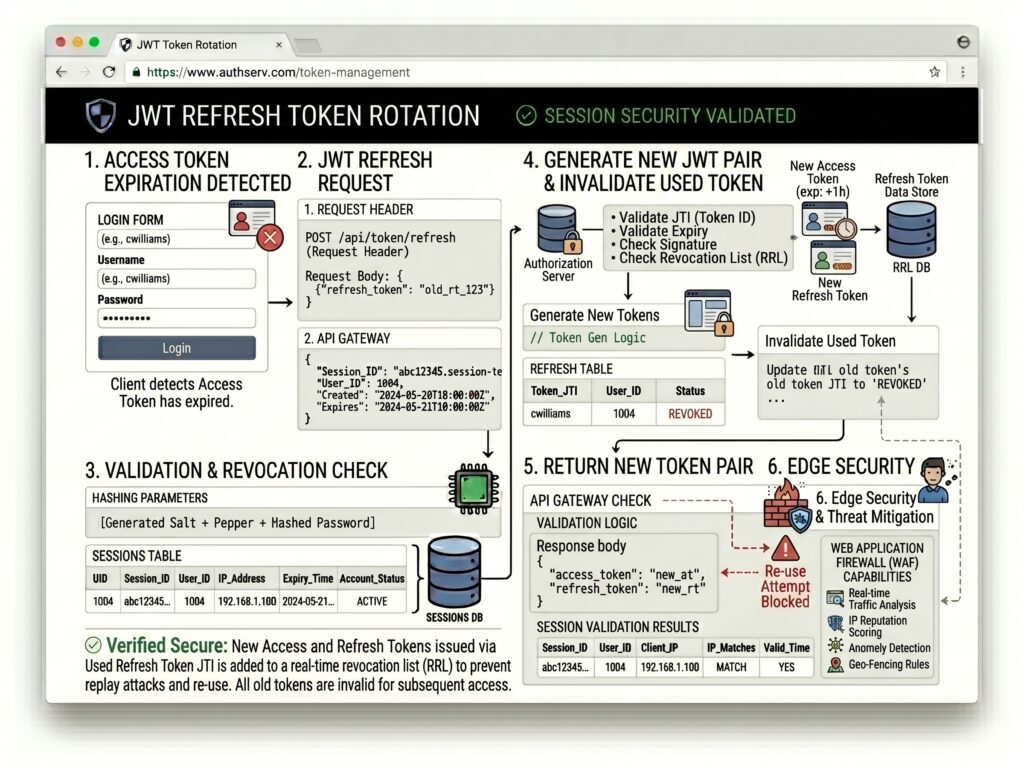
Refresh Token Architecture
┌─────────────────────────────────────────────┐
│         Login Response                      │
│  Access Token:  expires in 15 minutes       │
│  Refresh Token: expires in 7–30 days        │
└─────────────────────────────────────────────┘

Client uses Access Token for API calls
↓
Access Token expires
↓
Client sends Refresh Token to /auth/refresh
↓
Server validates Refresh Token
↓
Server issues NEW Access Token + NEW Refresh Token
↓
Old Refresh Token is invalidated (rotation)
Refresh Token Rotation
Every time a refresh token is used, it is replaced with a new one. The old token is immediately invalidated. This provides two critical security properties:
- Replay attack prevention — a stolen refresh token used by an attacker triggers rotation; the legitimate client’s next use of the old token will fail, signaling a compromise
- Stolen token detection — if the same refresh token is used twice (by attacker and legitimate user), both should be invalidated and the user forced to re-authenticate
async function refreshTokens(incomingRefreshToken) {
  const record = await db.refreshTokens.findByToken(hash(incomingRefreshToken));

  if (!record || record.used || record.expires_at < new Date()) {
    // If token was already used, this may indicate theft — invalidate all tokens
    if (record?.used) {
      await db.refreshTokens.revokeAllForUser(record.user_id);
    }
    throw new Error('Invalid refresh token');
  }

  // Mark old token as used (invalidate it)
  await db.refreshTokens.markUsed(record.id);

  // Issue new token pair
  const user = await db.users.findById(record.user_id);
  const newAccessToken = generateJWT(user);
  const newRefreshToken = await storeNewRefreshToken(user.id);

  return { accessToken: newAccessToken, refreshToken: newRefreshToken };
}
Secure Refresh Token Storage
- HttpOnly cookie — the recommended approach; JavaScript cannot read or steal the token
- Server-side tracking — store refresh tokens (hashed) in your database so you can revoke them
- Never store refresh tokens in
localStorage— XSS can steal them
Section 8: Common Authentication Security Mistakes
Mistake #1 — Storing Passwords in Plain Text
If your database is breached, every user’s password is immediately exposed — along with every other account they use that password on. Use Argon2 or bcrypt. Always.
Mistake #2 — Weak Password Policies
Requiring only 6 characters and no other constraints enables trivially guessable passwords. Enforce minimum length (12+) and screen against known breached passwords.
Mistake #3 — No Rate Limiting
Without rate limiting on login endpoints, an attacker can submit thousands of password guesses per second. Even a strong password policy becomes ineffective against sustained brute force.
Mistake #4 — Storing JWTs in localStorage
localStorage is accessible to any JavaScript running on the page. A single XSS vulnerability exposes every stored token. Store JWTs in HttpOnly cookies instead.
Mistake #5 — Missing HTTPS
Credentials and tokens transmitted over plain HTTP can be intercepted by anyone on the same network (coffee shop Wi-Fi, ISP, corporate proxies). HTTPS is non-negotiable. Obtain a free TLS certificate from Let’s Encrypt if cost is a barrier.
Mistake #6 — Predictable Password Reset Tokens
Password reset tokens generated from Math.random(), timestamps, or user IDs are predictable or enumerable. Use crypto.randomBytes(32).toString('hex') for cryptographically random tokens.
Mistake #7 — No Account Lockout Mechanism
Without lockout or progressive delays, automated tools can brute-force accounts indefinitely. Even a simple 5-attempt lockout with a 30-minute cooldown dramatically reduces this risk.
Mistake #8 — Improper Session Expiration
Sessions that never expire, or expire only on explicit logout, give attackers indefinitely valid tokens. Set absolute and idle expiration times. Force re-authentication for sensitive operations (changing email, making payments).
Mistake #9 — Using MD5 or SHA-1 for Password Hashing
MD5 and SHA-1 were designed for speed — the exact opposite of what you want for password hashing. A modern GPU can compute billions of MD5 hashes per second, meaning an 8-character password can be cracked in seconds. These algorithms also lack salting in their basic implementations. Never use them for passwords.
Mistake #10 — Ignoring MFA
Passwords alone are one factor. They can be phished, guessed, or leaked. MFA adds a second layer that an attacker typically cannot bypass even with a valid password. For any application handling sensitive data or financial information, MFA support is no longer optional.
Section 9: Password Reset Implementation
A secure password reset flow must prevent attackers from hijacking accounts by abusing the recovery mechanism.
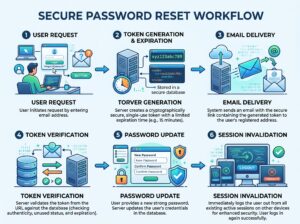
Secure Reset Flow
- User requests reset — submits email address
- Server response — always return the same message (“If this email exists, a reset link has been sent”) regardless of whether the email is registered; prevents account enumeration
- Token generation — generate a cryptographically random token:
crypto.randomBytes(32).toString('hex') - Token storage — store the hashed token and expiration (1 hour is typical) in your database, associated with the user account
- Email delivery — send a link:
https://yourdomain.com/reset-password?token=<raw_token> - Token verification — when the user clicks the link, hash the submitted token and look it up; verify it hasn’t expired
- Single-use enforcement — delete the reset token immediately after use, or after expiration
- Password update — hash the new password with Argon2/bcrypt and update the stored hash
- Session invalidation — invalidate all existing sessions and tokens after a password change
async function initiatePasswordReset(email) {
  const user = await db.users.findByEmail(email);
  // Always respond the same way regardless of whether user exists
  if (!user) return;

  const rawToken = crypto.randomBytes(32).toString('hex');
  const hashedToken = crypto.createHash('sha256').update(rawToken).digest('hex');
  const expires = new Date(Date.now() + 60 * 60 * 1000); // 1 hour

  await db.resetTokens.create({
    userId: user.id,
    token: hashedToken,
    expiresAt: expires,
  });

  await sendEmail(user.email, `Reset your password: https://app.example.com/reset?token=${rawToken}`);
}
Common Reset Vulnerabilities
- Long-lived tokens — reset tokens that never expire give attackers unlimited time to use intercepted emails
- Reusable tokens — tokens that remain valid after use allow attackers who later gain email access to reset again
- Predictable tokens — non-random tokens can be guessed or enumerated
- No rate limiting on reset requests — enables email flooding and enumeration attacks
Section 10: Advanced Security Enhancements
Multi-Factor Authentication (MFA)
TOTP (Time-based One-Time Passwords): The most widely adopted MFA mechanism. An authenticator app (Google Authenticator, Authy, 1Password) generates a 6-digit code that changes every 30 seconds. The server and app share a secret key; both independently compute the current code and compare.
const speakeasy = require('speakeasy');

// During MFA setup — generate and store secret
const secret = speakeasy.generateSecret({ length: 20 });
// Store secret.base32 in user record
// Show secret.otpauth_url as QR code for user to scan

// During login — verify submitted code
const verified = speakeasy.totp.verify({
  secret: user.mfa_secret,
  encoding: 'base32',
  token: submittedCode,
  window: 1, // Allow 30-second drift
});
SMS as MFA: Convenient but weaker than TOTP. Susceptible to SIM-swapping attacks. If you offer SMS MFA, offer TOTP as a stronger alternative and recommend it.
Backup codes: Always provide single-use backup codes in case users lose access to their authenticator. Store these hashed.
Device Recognition
When a user logs in from an unrecognized device or browser, send an alert email and optionally require additional verification. Track trusted devices by storing a signed device fingerprint (browser, OS, screen resolution, etc.) in a long-lived cookie. Flag logins from new devices for review.
Risk-Based Authentication
Evaluate risk signals on every login and escalate authentication requirements when anomalies are detected:
- New geolocation — user authenticating from a country they’ve never logged in from before
- Suspicious IP — IP address flagged by threat intelligence feeds
- Impossible travel — login from London and Tokyo within 2 hours
- Time anomalies — login at 3 AM when user always logs in during business hours
When risk is elevated, trigger step-up authentication (require MFA even if not normally required, send email confirmation, add CAPTCHA).
Audit Logging
Every authentication event should be logged with enough detail for forensic analysis:
- Login success/failure (with IP, user agent, timestamp)
- Password changes and resets
- MFA enrollment and removal
- Account lockouts
- Token issuance and revocation
async function logAuthEvent(event) {
  await db.auditLog.create({
    userId: event.userId,
    action: event.action, // 'login_success', 'login_failure', 'password_reset', etc.
    ipAddress: event.ip,
    userAgent: event.userAgent,
    metadata: event.metadata,
    createdAt: new Date(),
  });
}
Real-World Authentication Architecture: SaaS Application
Here’s how a complete, production-grade authentication system fits together:
┌──────────────────────────────────────────────────────────────┐
│                     Client (Browser/App)                     │
│  - Access Token: HttpOnly cookie (15min)                     │
│  - Refresh Token: HttpOnly cookie (7 days)                   │
└──────────────────────┬───────────────────────────────────────┘
                       │ HTTPS only
┌──────────────────────▼───────────────────────────────────────┐
│                   API Gateway / Load Balancer                │
│  - TLS termination                                           │
│  - Rate limiting (per IP + per account)                      │
│  - DDoS protection                                           │
└──────────────────────┬───────────────────────────────────────┘
                       │
┌──────────────────────▼───────────────────────────────────────┐
│                 Authentication Service                        │
│                                                              │
│  POST /auth/register   → validate → hash (Argon2id) → store  │
│  POST /auth/login      → verify hash → issue JWT + refresh   │
│  POST /auth/refresh    → rotate refresh token → new JWT      │
│  POST /auth/logout     → revoke refresh token → clear cookie │
│  POST /auth/mfa/setup  → generate TOTP secret → QR code      │
│  POST /auth/mfa/verify → verify TOTP code                    │
│  POST /auth/reset      → generate reset token → email        │
└──────────────────────┬───────────────────────────────────────┘
                       │
       ┌───────────────┼───────────────┐
       ▼               ▼               ▼
  ┌─────────┐    ┌──────────┐    ┌──────────┐
  │  Users  │    │ Sessions │    │  Audit   │
  │   DB    │    │  Redis   │    │   Log    │
  └─────────┘    └──────────┘    └──────────┘
Key implementation decisions:
- Argon2id for password hashing (memory_cost: 65536, time_cost: 3)
- JWTs signed with RS256 (asymmetric — public key can be distributed to microservices for validation)
- Refresh tokens stored hashed in PostgreSQL with rotation on every use
- Redis for rate limiting counters and session data
- All auth events written to append-only audit log
- MFA with TOTP enforced for admin roles, optional for standard users
- Password reset tokens expire in 1 hour, single-use
- Risk-based step-up authentication on anomalous logins
Best Practices Checklist
✅ Use Argon2id or bcrypt for password hashing — never MD5, SHA-1, or plain SHA-256
✅ Enable HTTPS everywhere — obtain TLS certificates from Let’s Encrypt if needed
✅ Store JWTs and session IDs in HttpOnly cookies, not localStorage
✅ Set Secure and SameSite=Lax (or Strict) on all auth cookies
✅ Implement rate limiting on all authentication endpoints
✅ Lock accounts (temporarily) after repeated failed login attempts
✅ Generate password reset tokens with crypto.randomBytes(32)
✅ Make reset tokens single-use and expire them after 1 hour
✅ Return generic error messages for login failures — never reveal whether an email exists
✅ Issue short-lived access tokens (15–60 minutes)
✅ Use refresh tokens with rotation to maintain sessions without long-lived access tokens
✅ Invalidate all sessions and tokens immediately after a password change
✅ Support TOTP-based MFA — recommend authenticator apps over SMS
✅ Send account alerts for new device logins, password changes, and MFA changes
✅ Log all authentication events with IP, user agent, and timestamp
✅ Regenerate session IDs immediately after login (prevent session fixation)
✅ Validate and normalize all user input before processing
✅ Hash stored refresh tokens — don’t store them in plain text
✅ Use constant-time comparison for token validation to prevent timing attacks
✅ Implement email verification before activating new accounts
✅ Check passwords against breach databases (HaveIBeenPwned API) at registration
✅ Use RS256 (asymmetric) JWT signing in microservice architectures
✅ Set absolute and idle session timeouts — don’t let sessions live forever
✅ Implement risk-based step-up authentication for anomalous login patterns
✅ Provide MFA backup codes — store them hashed
✅ Never log passwords, tokens, or secrets in application logs
✅ Use a secrets manager (AWS Secrets Manager, HashiCorp Vault) for JWT secrets and keys
Conclusion
Building a secure authentication system is not about picking a library and calling it done. It’s a set of deliberate design decisions that work together:
Password hashing — Argon2id is the current gold standard. bcrypt remains acceptable. MD5 and SHA-1 are not hashing algorithms for passwords — they’re hash functions that were never designed for this purpose and should never be used for it.
Session vs JWT — Both are valid. Sessions are simpler to revoke and reason about; JWTs are more scalable. Most modern applications pair short-lived JWTs with rotating refresh tokens to get the benefits of both.
Common mistakes — plain text storage, missing rate limits, long-lived tokens in localStorage, predictable reset tokens, and skipping MFA support are the failures that appear in breach after breach.
Defense in depth — no single mechanism is sufficient. Argon2 + HTTPS + rate limiting + MFA + audit logging + short-lived tokens creates a layered system where each layer limits the damage if another fails.
Authentication is not a feature; it is a security boundary. Every design decision directly affects user trust and application security.
Your users trust you with access to their accounts. The companies that take that trust seriously — implementing these practices systematically, testing them rigorously, and updating them as the threat landscape evolves — are the ones that earn and keep that trust. The ones that treat authentication as a checkbox item are the ones you read about in breach notifications.
Build it right.
Frequently Asked Questions
Q1: bcrypt or Argon2 — which should I choose for new projects?
Argon2id for new projects. It’s the winner of the Password Hashing Competition, designed to resist both GPU-based attacks (through memory hardness) and side-channel attacks. bcrypt remains a solid choice for existing systems or environments where Argon2 library support is limited, but Argon2id is the modern default.
Q2: Are JWTs secure?
JWTs are as secure as their implementation. A JWT stored in an HttpOnly cookie, signed with a strong algorithm (RS256 or HS256 with a long random secret), with a short expiration time (15 minutes), and validated on every request is secure. A JWT stored in localStorage with a 30-day expiration, signed with a weak secret, is not. The format isn’t inherently insecure — the implementation determines security.
Q3: How do I revoke a JWT before it expires?
The canonical approaches are: (1) maintain a token blocklist (store invalidated JWI IDs in Redis until their expiration time passes), (2) use short-lived access tokens (15 minutes) so compromise windows are minimal, (3) track a tokenVersion on the user record — include it in the JWT payload, and on validation, check the payload version matches the current stored version. Incrementing the stored version effectively invalidates all previously issued tokens.
Q4: Is session-based authentication still relevant?
Yes. For traditional web applications where the server and client share the same domain, session-based authentication is simple, reliable, and easy to revoke. The arguments for JWTs are strongest in API-driven architectures, mobile apps, and microservice environments. Choose based on your architecture, not hype.
Q5: How often should refresh tokens rotate?
On every use. Single-use rotation (also called refresh token rotation) means each call to the refresh endpoint returns a new refresh token and invalidates the old one. This allows detection of token theft: if a stolen token is used after the legitimate client has already rotated it, the mismatch reveals the compromise.
Q6: What’s wrong with SMS-based MFA?
SMS MFA is vulnerable to SIM-swapping attacks, where an attacker convinces a carrier to transfer the target’s phone number to a SIM they control. It’s also vulnerable to SS7 protocol attacks. SMS MFA is significantly better than no MFA, but TOTP-based authenticator apps or hardware keys (FIDO2/WebAuthn) are substantially more secure alternatives.
Q7: How should I handle password reset securely?
Generate a cryptographically random token (32 bytes minimum), store its SHA-256 hash in your database with an expiration of 1 hour, send the raw token in a link to the user’s email, verify and delete it on use, invalidate all other sessions after the password changes. Never expose whether an email address exists in your system through the reset flow.
Q8: What are the NIST guidelines on passwords?
NIST SP 800-63B (Digital Identity Guidelines) recommends: minimum 8 characters (most practitioners recommend 12+), maximum length of at least 64 characters, allow all printable ASCII and Unicode characters, do not require periodic mandatory rotation, screen passwords against breach databases, and do not impose complexity rules that encourage predictable patterns.
Q9: Should I build authentication from scratch or use an identity provider?
For most applications, an identity provider (Auth0, Clerk, Supabase Auth, AWS Cognito) is the pragmatic choice. They handle the complexity, keep up with security updates, and offer MFA, social login, and compliance out of the box. Building from scratch is appropriate when you have specific requirements, deep security expertise, or constraints that off-the-shelf solutions can’t meet.
Q10: What is the minimum viable secure authentication system?
At minimum: HTTPS everywhere, Argon2id or bcrypt for password hashing, email verification on registration, rate limiting on login, generic error messages, secure HttpOnly cookies for session/token storage, password reset with expiring single-use tokens, and a mechanism to invalidate sessions on password change. Every other enhancement in this article adds meaningful security on top of that foundation.